Your browser does not support JavaScript or its disabled!
Please turn it on, or be aware that some features on this website will not work correctly.
Play Browser
Downloads Join Discord
Latest News Account Community Forum Library Shop
Mistofdeath » Download Tibia OT 8.6 Client Server Online » Players Online: 15 / 1000 » Monsters: 9659 » Uptime: day, 11h 56m

Mist of Death Client Downloads
Mist of Death runs on Tibia 8.60 and this page is the official download route for the browser client and the bundled Mist of Death clients for Android, Windows, and macOS.
If you want the full onboarding path after installation, continue to Start Here, Commands, and FAQ.

Mist of Death Is Live
Server is online. Join now through Downloads or log in to your account.

Play Instantly in Browser
Fastest option Play in Browser
How it works Open the browser client, press Start, then log in with the same website account and character you use for Mist of Death.
Still want the app? The official Android APK and the supported Windows and macOS desktop downloads are listed below.

Windows Client — Mist of Death Edition
Windows Download the supported Windows client (.zip with mounts, the newest assets, and automatic updates). This packaged build is maintained and preconfigured specifically for Mist of Death.
Windows launch Extract the whole zip into one folder, then run otclient.exe from that folder.
Windows runtime If Windows reports missing Microsoft runtime files after extracting the zip, install the Visual C++ Redistributable x86.
Windows reset If OTClient will not log in, looks wrong after an update, or the client/server dropdown is empty, close the client, open %AppData% in Windows search or File Explorer, delete the OTCR folder, then start Mist of Death OTClient again.
Connection The packaged clients are preconfigured for Mist of Death. If you ever need manual values, use host mistofdeath.com and port 7171.
Quick setup Windows: download the zip, extract all files, keep otclient.exe beside the data, modules, and mods folders, then launch it from that folder.
macOS players should follow the dedicated Mac route further down this page and keep the Mac setup guide open while installing.
After launching the client, log in with your website account.

Android APK — Mist of Death Mobile Beta

Mist of Death for Android

Our mobile build is packaged and preconfigured specifically for Mist of Death, with touch controls, an on-screen joystick, configurable spell buttons, and mobile chat controls.

  • 0.1.0-beta.45
  • 147.1 MB
  • Android 5.0+
  • 64-bit ARM
  • HTTPS download
Download the Android APK

About Android's warning: this APK is downloaded directly from mistofdeath.com, not Google Play, so your browser may warn that APK files can install apps. That warning is normal for direct APK downloads. Check that the address begins with https://mistofdeath.com/, then continue only if it does.

  1. Download the APK using the red button above.
  2. If your browser asks whether to keep the APK, confirm only after checking the mistofdeath.com address.
  3. Open the downloaded file and let Android install the update.
  4. Your saved login, bot settings, and spell-bar setup are preserved when updating.
Verify the official APK checksum SHA-256: 51d746d00e3b3fde6308156f2904074577f15a899376ad782a6f916e6a690ab3
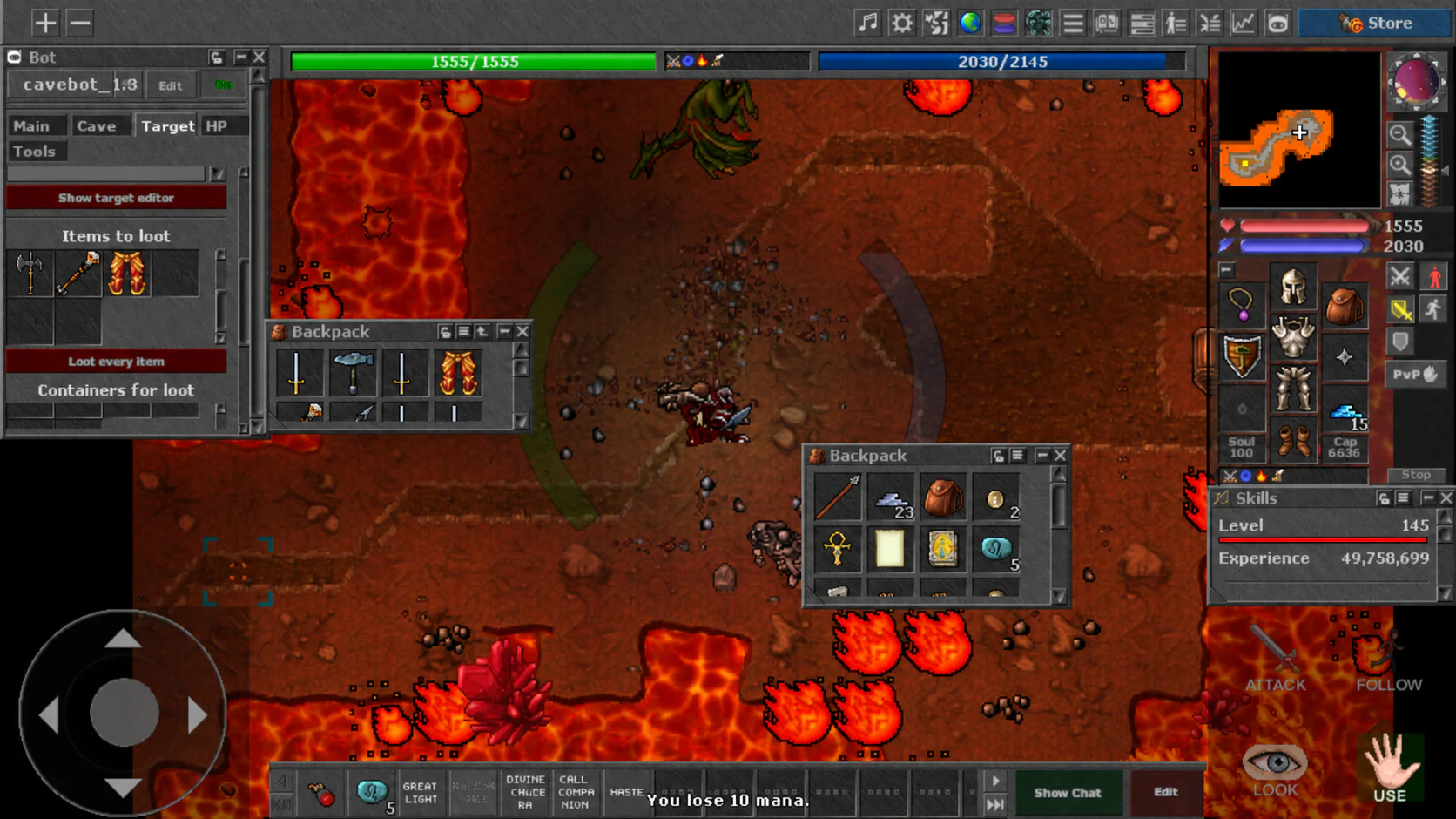
Mist of Death running on Android with touch controls, action buttons, inventory, and the game map visible

Mac Client — Mist of Death Edition
Mac Download the supported Mac client (.zip with mounts, the newest assets, and automatic updates). A dedicated macOS OTClient package is rare; this build is maintained and preconfigured specifically for Mist of Death.
Move the app Unzip the starter pack and move Mist of Death.app into Applications.
Install XQuartz Install XQuartz once, then log out and back in once before your first launch. The install methods are listed in the XQuartz section just below.
Open the app Double-click Mist of Death.app. If macOS blocks it the first time, use System Settings -> Privacy & Security -> Open Anyway.
Login The Mist of Death server entry is already preloaded. Sign in with the same website account and password you used to create your character.
More help Use the full Mac setup guide if you want the slower step-by-step route.
Watch it Follow the real Mac install flow below. Click the video to pause or resume, or use the custom rewind, forward, and scrub controls under it without opening the default control bar.
0:00 / 0:00

Before You Login
1. Create your account on the website.
2. Create at least one character.
3. Make sure manual OTClient setups point to mistofdeath.com:7171.
4. If you play on macOS, use the Mac client section above and the XQuartz guide below before your first launch.
5. If you need help with commands after login, check the Commands page.
6. For server updates, support, trade, and guild recruitment, use the official Discord page.

What Is XQuartz?
XQuartz badge XQuartz XQuartz is the open-source version of the X.Org X Window System that runs on macOS. In simple terms, it gives older or cross-platform apps an X11 display layer so they can open normally on a Mac.
Why Mist of Death needs it The current Mac OTClient build depends on X11 libraries, so XQuartz is what lets the client render its window and input correctly on macOS.
Install with Homebrew Run brew install --cask xquartz, then log out and back in once before opening Mist of Death for the first time.
Install from the official site Download the current installer from xquartz.org, run the package, then log out and back in once.
What to do next After XQuartz is installed, open Mist of Death.app again. The app wrapper starts XQuartz for you and launches the bundled client.

Currently there are 8 visitors.
Page has been viewed 501267 times.
Load time: 0.0697 seconds.
Powered by MyAAC.